Welcome to Active Thai!
Our Interactive Lessons Teach You to
Read, Write, Speak, and Understand Thai!
Get started learning the Thai consonants with the app below, and you could be speaking Thai the next time you're in Thailand!
44 Letters, 20 Sounds


Like our app? Please share it!
Active Thai is a membership website that depends on people who appreciate the time and effort that has gone into making our new and innovative ways to learn the Thai language, and are willing to contribute a little so we can keep a members only area that is free of annoying advertising. If you are one of those people, please join us.
Your Internet Connection:
This website contains several hundred sound files. Each application has a few of these that must be downloaded before it will start. This all works best with a quality high-speed connection to the Internet. Although it has been designed to work with a modern smart phone, you'll need a good data connection. If you experience slow download speeds, try using a wifi connection. Thank you for using our site. We hope you like it.
Enable browser sound:
To use our programs, you may need to enable the sound in your browser:
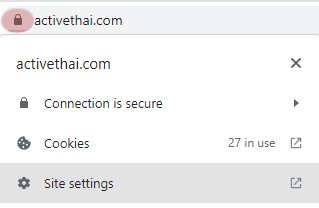
Chrome Browser:- Click on the lock icon, to the left of our domain name.
- Select Site Settings from the list.
- On the Privacy and Security section, under Permissions, find Sound.
- Select Allow
Firefox Browser:
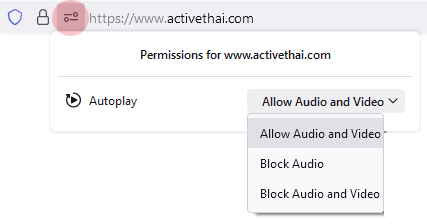
- Click on the Permissions icon, to the left of our domain name.
- Select Allow audio and video.
- Allow Autoplay.
Other browsers will have similar settings. You will need to find them to enable sound. Some browsers do not have an autoplay option. For these you will need to click the play icon each time you want to listen.
Lesson Navigation:
- Overview of the 44 Thai Consonants
- The Thai Middle Class Consonants
- The Thai High Class Consonants
- The Thai Low Class Consonants
- The Consonant Names in English
- The Consonant Names in Thai
- Match the Sound to the Consonant
- Thai Consonant Handwriting
- Thai Consonant Keyboard
- Consonant Names Test
- What Class is this Consonant
- Which Consonant is in this Class
- Middle Class Consonants Test
- High Class Consonants Test
- Low Class Consonants Test
- The 32 Thai Vowels
- 12 Short Vowel Sounds
- 12 Long Vowel Sounds
- 8 Special Vowel Symbols
- Compare Long & Short Vowels
- Long & Short Vowel - Part 1
- Long or Short Vowel - Part 2
- Long or Short Vowel - Part 3
- Thai Vowel Names - Part 1
- Thai Vowel Names - Part 2
- Thai Vowel Names - Part 3
- Listen and Write the Thai Vowels
- Listen and Type the Thai Vowels
- Test - The 14 Thai Short Vowels
- Test - The 18 Thai Long Vowels
- Test - Match Vowel Sound to Shape
- Complex Vowel Sounds
- The Thai Writing System
- Basic Thai Syllable - Short Sound
- Basic Thai Syllable - Long Sound
- The Thai Final Consonants
- Consonants in Final Position
- Consonants Never in Final Position
- Consonant Sounds Used
- Consonant Sounds not Used
- Select the Correct Final Sound
- Match a Sound to the Consonants
- Sonorant and Stop Finals
- Sonorant vs Stop Sounds
- Select the Final Sound Type
- Consonant+Vowel+Stop Final
- Consonant+Vowel+Sonorant Final
- Listen and Write Thai Syllables
- Listen and Read Thai Syllables
- Listen and Type Thai Syllables
- Seven Vowels That Change
- Practice the Seven Changing Vowels
- The Four Thai Tone Marks
- Live and Dead Syllables
- Middle Class, Live or Dead?
- Middle Class, Mid or Low Tone?
- Tone Rules for Middle Class
- High Class, Live or Dead?
- High Class, Rising or Low?
- Tone Rules for High Class
- Low Class, Live or Dead?
- Low Class - Mid, High or Falling?
- Tone Rules for Low Class
- Tone Rule Practice
- Tone Rule Test - Listen and Read
- Tone Rule Test - Read and Choose
- Hello, Good day!
- Dialog: Greeting someone.
- Vocabulary for This Lesson
- Overview of Spelling and Tone
- Practice Recognizing Words
- Practice Recognizing Spelling
- Practice Identifying Correct Tone
- Practice Word Meaning
- Practice Word Handwriting
- Practice Word Typing
- Study the Thai Dialog
- I am fine, you are fine
- Switching Personal Pronouns
- The Thai Question Particles
- Statements into Questions
- Responding in the Right Way
- Practice Responding
- Vocabulary Review
- Phrases You Should Know
- Practice The Thai Greeting
- Revisit the Dialog Recording
- How to Introduce Yourself
- Dialog: Introducing yourself
- Vocabulary for This Lesson
- Overview of Spelling and Tone
- Practice Recognizing Words
- Practice Recognizing Spelling
- Practice Identifying Correct Tone
- Practice Word Meaning
- Practice Word Handwriting
- Practice Word Typing
- Study the Thai Dialog
- About the Thai Question Words
- Asking and Answering
- Practice Switching Pronouns
- Yes and No Questions
- Practice Replying with Yes or No
- The Negative Response
- Practice Replying and Correcting
- Confirming Information
- Compare Question Formats
- Ways to Answer
- Questions About Other People
- ใช่ไหม - Questions About You
- หรือ เปล่า - Questions About You
- Vocabulary Review
- Practice Important Phrases
- Revisit the Dialog Recording
- Getting started with nouns
- This one, or That one
- Dialog: What is this?
- Vocabulary for This Lesson
- Overview of Spelling and Tone
- Practice Recognizing Words
- Practice Recognizing Spelling
- Practice Identifying Correct Tone
- Practice Word Meaning
- Practice Word Handwriting
- Practice Word Typing
- Study the Thai Dialog
- Listen and Identify Nouns
- Practice using นี่ , นั่น , and โน่น
- Questions using This and That
- Noun Questions with อะไร
- This and That Questions with ใช่ไหม
- Q and A using นี่ , นั่น , and โน่น
- Listen, Repeat, and Answer
- Revisiting the Lesson Dialog
- Reviewing Ways to Form Questions
- More Practice Questions
- Learning the name of things
- Asking What was Said
- Asking Someone to Repeat Something
- Dialog: What's this called?
- Vocabulary for This Lesson
- Thai Spelling and Tone
- Practice Recognizing Words
- Practice Recognizing Spelling
- Practice Identifying Correct Tone
- Practice Word Meaning
- Practice Word Handwriting
- Practice Thai Keyboard
- Study the Thai Dialog
- Statements & Questions with เรียกว่า
- What Something is Not Called - Using เรียกว่า
- Grammar Drill Using เรียกว่า
- Practice Questions with เรียกว่า
- Responding with a Correction
Application Settings:
Lesson Navigation:
- Overview of the 44 Thai Consonants
- The Thai Middle Class Consonants
- The Thai High Class Consonants
- The Thai Low Class Consonants
- The Consonant Names in English
- The Consonant Names in Thai
- Match the Sound to the Consonant
- Thai Consonant Handwriting
- Thai Consonant Keyboard
- Consonant Names Test
- What Class is this Consonant
- Which Consonant is in this Class
- Middle Class Consonants Test
- High Class Consonants Test
- Low Class Consonants Test
- The 32 Thai Vowels
- 12 Short Vowel Sounds
- 12 Long Vowel Sounds
- 8 Special Vowel Symbols
- Compare Long & Short Vowels
- Long & Short Vowel - Part 1
- Long or Short Vowel - Part 2
- Long or Short Vowel - Part 3
- Thai Vowel Names - Part 1
- Thai Vowel Names - Part 2
- Thai Vowel Names - Part 3
- Listen and Write the Thai Vowels
- Listen and Type the Thai Vowels
- Test - The 14 Thai Short Vowels
- Test - The 18 Thai Long Vowels
- Test - Match Vowel Sound to Shape
- Complex Vowel Sounds
- The Thai Writing System
- Basic Thai Syllable - Short Sound
- Basic Thai Syllable - Long Sound
- The Thai Final Consonants
- Consonants in Final Position
- Consonants Never in Final Position
- Consonant Sounds Used
- Consonant Sounds not Used
- Select the Correct Final Sound
- Match a Sound to the Consonants
- Sonorant and Stop Finals
- Sonorant vs Stop Sounds
- Select the Final Sound Type
- Consonant+Vowel+Stop Final
- Consonant+Vowel+Sonorant Final
- Listen and Write Thai Syllables
- Listen and Read Thai Syllables
- Listen and Type Thai Syllables
- Seven Vowels That Change
- Practice the Seven Changing Vowels
- The Four Thai Tone Marks
- Live and Dead Syllables
- Middle Class, Live or Dead?
- Middle Class, Mid or Low Tone?
- Tone Rules for Middle Class
- High Class, Live or Dead?
- High Class, Rising or Low?
- Tone Rules for High Class
- Low Class, Live or Dead?
- Low Class - Mid, High or Falling?
- Tone Rules for Low Class
- Tone Rule Practice
- Tone Rule Test - Listen and Read
- Tone Rule Test - Read and Choose
- Hello, Good day!
- Dialog: Greeting someone.
- Vocabulary for This Lesson
- Overview of Spelling and Tone
- Practice Recognizing Words
- Practice Recognizing Spelling
- Practice Identifying Correct Tone
- Practice Word Meaning
- Practice Word Handwriting
- Practice Word Typing
- Study the Thai Dialog
- I am fine, you are fine
- Switching Personal Pronouns
- The Thai Question Particles
- Statements into Questions
- Responding in the Right Way
- Practice Responding
- Vocabulary Review
- Phrases You Should Know
- Practice The Thai Greeting
- Revisit the Dialog Recording
- How to Introduce Yourself
- Dialog: Introducing yourself
- Vocabulary for This Lesson
- Overview of Spelling and Tone
- Practice Recognizing Words
- Practice Recognizing Spelling
- Practice Identifying Correct Tone
- Practice Word Meaning
- Practice Word Handwriting
- Practice Word Typing
- Study the Thai Dialog
- About the Thai Question Words
- Asking and Answering
- Practice Switching Pronouns
- Yes and No Questions
- Practice Replying with Yes or No
- The Negative Response
- Practice Replying and Correcting
- Confirming Information
- Compare Question Formats
- Ways to Answer
- Questions About Other People
- ใช่ไหม - Questions About You
- หรือ เปล่า - Questions About You
- Vocabulary Review
- Practice Important Phrases
- Revisit the Dialog Recording
- Getting started with nouns
- This one, or That one
- Dialog: What is this?
- Vocabulary for This Lesson
- Overview of Spelling and Tone
- Practice Recognizing Words
- Practice Recognizing Spelling
- Practice Identifying Correct Tone
- Practice Word Meaning
- Practice Word Handwriting
- Practice Word Typing
- Study the Thai Dialog
- Listen and Identify Nouns
- Practice using นี่ , นั่น , and โน่น
- Questions using This and That
- Noun Questions with อะไร
- This and That Questions with ใช่ไหม
- Q and A using นี่ , นั่น , and โน่น
- Listen, Repeat, and Answer
- Revisiting the Lesson Dialog
- Reviewing Ways to Form Questions
- More Practice Questions
- Learning the name of things
- Asking What was Said
- Asking Someone to Repeat Something
- Dialog: What's this called?
- Vocabulary for This Lesson
- Thai Spelling and Tone
- Practice Recognizing Words
- Practice Recognizing Spelling
- Practice Identifying Correct Tone
- Practice Word Meaning
- Practice Word Handwriting
- Practice Thai Keyboard
- Study the Thai Dialog
- Statements & Questions with เรียกว่า
- What Something is Not Called - Using เรียกว่า
- Grammar Drill Using เรียกว่า
- Practice Questions with เรียกว่า
- Responding with a Correction